AI image generation is no longer just a novelty for tech enthusiasts. It has become a practical tool that real estate professionals can use today to help buyers visualize an empty property — without hiring a staging company, renting furniture, or waiting weeks for a photo shoot.
This post walks through how we used a tool called Nano Banana, built on Google’s Gemini image model and integrated directly into Claude Code, to generate design-quality staging images for a listing. It is not a replacement for professional photography. It is a way to show buyers what a space can become — and to do it in hours, not days.
Empty rooms cost sellers money
Buyers struggle to visualize scale, flow, and livability in vacant homes. Study after study from the National Association of Realtors confirms that staged homes sell faster and closer to asking price than empty ones. The problem is that physical staging is expensive — often $1,500 to $5,000 or more depending on the property — and not every seller has that budget or timeline.
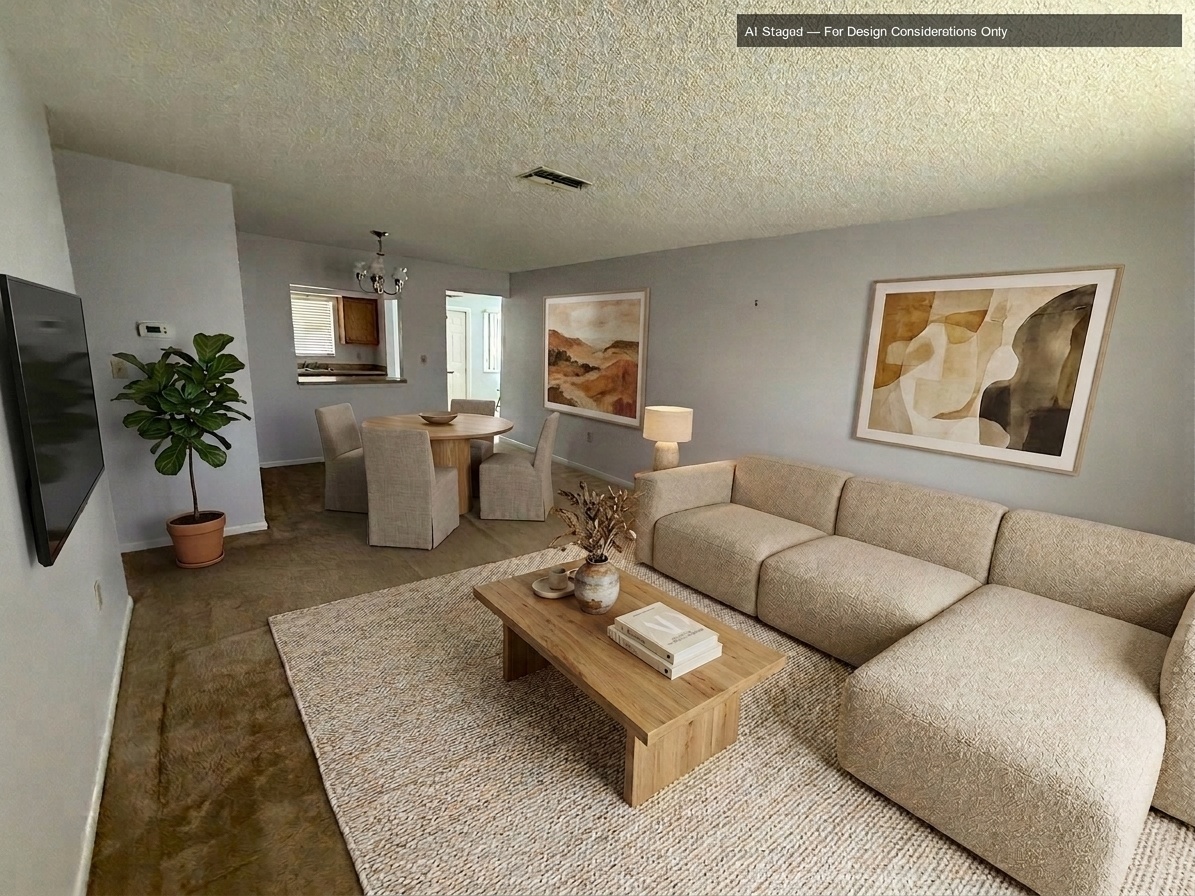
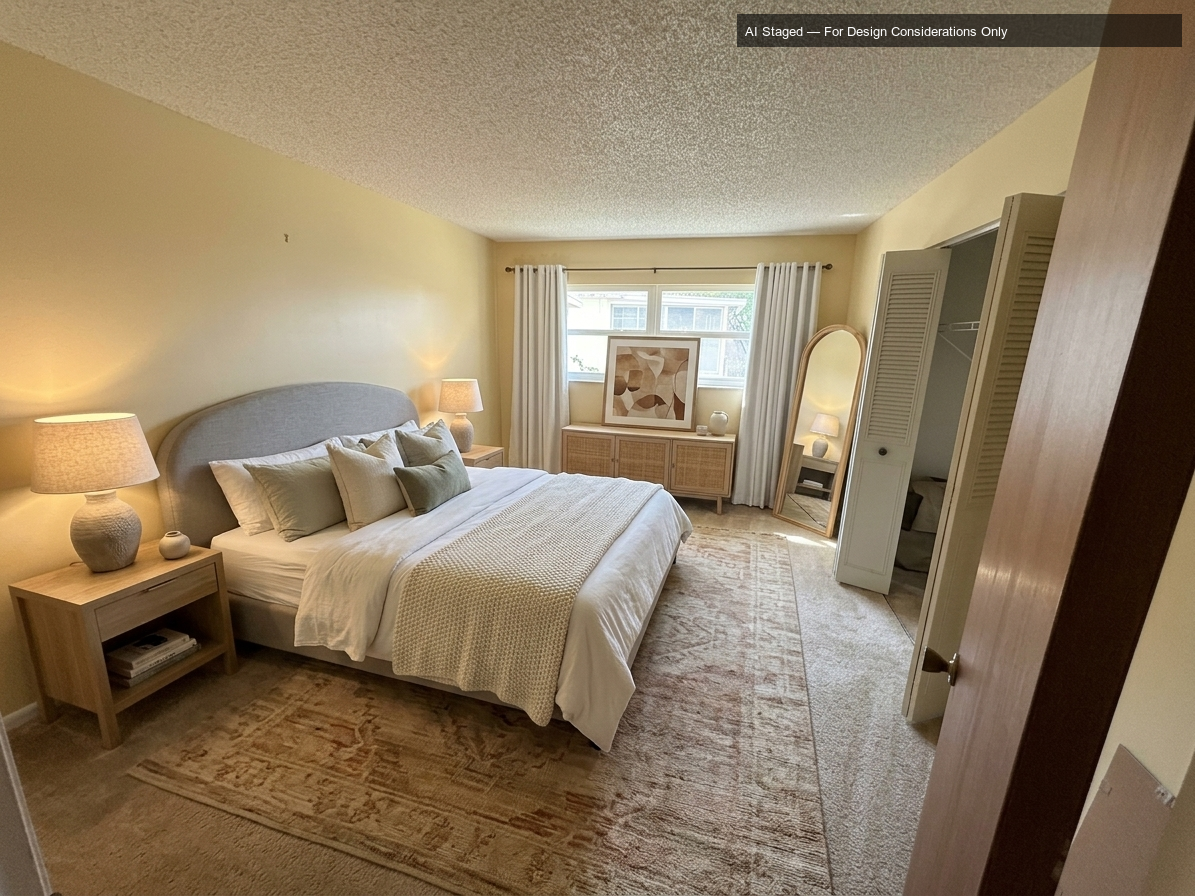
AI-generated staging images fill that gap. They are not actual photographs of furnished rooms. They are design renderings created from your existing room photos, and when disclosed properly, they give buyers a starting point for imagination that an empty beige box simply cannot.
How the Nano Banana skill works inside Claude
Nano Banana is a skill layer for Claude Code that connects to Google’s Gemini image generation model. You provide a room photo and a description of how you want the space to look. The model analyzes the existing architecture — the walls, windows, doors, flooring, ceiling, and light — and generates a furnished version that respects those physical boundaries.
It is not a filter. It does not paste furniture cutouts onto a photo. The model reasons about the space and generates a coherent interior scene from the ground up, guided by a detailed prompt describing style, furniture, materials, and lighting.
For a recent Pinellas County listing, we ran this process on two rooms in under an hour.
What the process looks like step by step
Step 1: Install the Banana Claude skill.
Start with the setup guide in the AgriciDaniel/banana-claude GitHub repository. In Claude Code, the recommended plugin install is to add the marketplace and install the plugin:
/plugin marketplace add AgriciDaniel/banana-claude
/plugin install banana-claude@banana-claude-marketplace
Step 2: Set up Google AI Studio.
Create or open a Google AI Studio account and generate a Google AI API key. The Banana Claude setup uses that key to connect Claude Code to Google’s Gemini image model.
Step 3: Connect the skill inside Claude.
After the plugin is installed, run the setup command in Claude Code and paste in the Google AI API key when prompted:
/banana setup
Step 4: Upload or reference the room photo.
Use the actual listing photo as the starting point. For an existing image, the workflow is to point Claude to the photo file and describe the staging direction with the edit command:
/banana edit ~/path/to/living-room.jpg "stage this vacant living room in a warm modern style, keeping the walls, windows, flooring, ceiling, and room layout accurate"
Step 5: Refine the image before using it.
Review the result closely. Ask Claude for specific edits such as removing an extra object, changing artwork, adjusting furniture scale, or cleaning up small visual issues. Save only the version that still respects the real room.
Step 6: Add a clear disclosure label.
Before using the image in marketing or MLS materials, label it clearly as AI-staged. Our label reads: AI Staged — For Design Considerations Only. Buyers and their agents should immediately understand that the image is a design rendering, not a furnished-room photograph.
What this means before you list
- AI staging works best for vacant or nearly vacant properties. Occupied homes with existing furniture are better served by traditional staging consultation.
- Use it alongside real photography, not instead of it. MLS rules vary by board. Confirm with your local board how AI-generated images must be labeled and where they may appear in a listing.
- The quality of the output depends on the quality of the input. A well-lit, well-composed room photo produces a usable design rendering. A dark or cluttered photo produces a confused one.
- Iterate quickly and cheaply. A single image costs roughly $0.13 to generate at full quality. Testing three or four design directions for a bedroom costs less than a cup of coffee.
AI-generated staging is a disclosure and expectation-setting tool. Used honestly, it helps buyers see potential in spaces that photographs alone cannot communicate. That is good for sellers, good for buyers, and good for a market where first impressions are formed online before anyone walks through a door.
Broderick & Associates uses current technology to help Tampa Bay sellers present their properties effectively. If you are preparing a home for sale and want to explore what AI-assisted staging could look like for your listing, reach out directly.